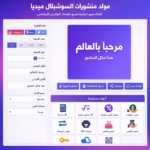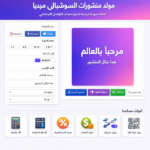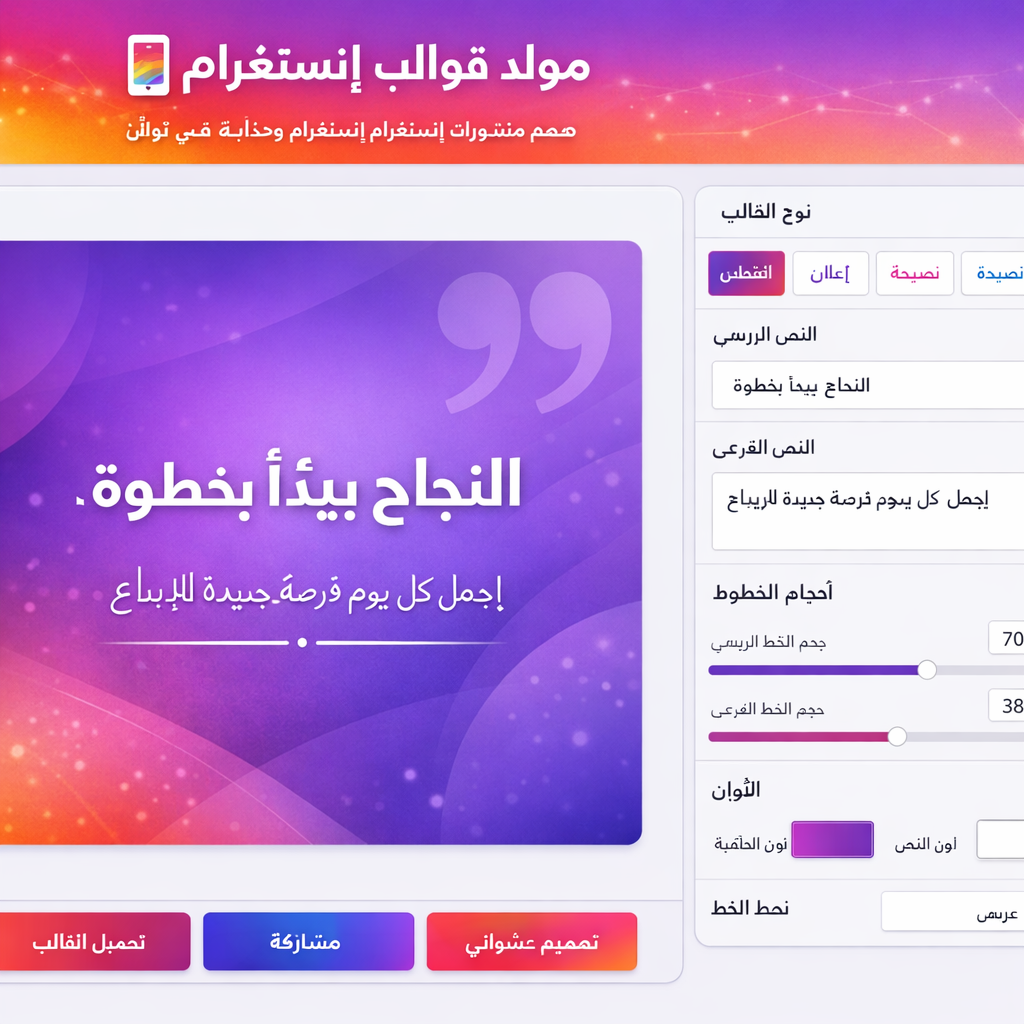
هذه الأداة المجانية تصمم منشورات إنستغرام احترافية وجذابة في ثوانٍ، وتجيبك عن سؤالك حول كيفية إنشاء قصص إنستغرام احترافية على جهاز الكمبيوتر.
📱 مولد قوالب إنستغرام
صمم منشورات إنستغرام احترافية وجذابة في ثوانٍ
جدول المحتويات
تُعتبر قصص إنستغرام وسيلة فعّالة لمشاركة اللحظات اليومية وتعزيز التفاعل بين العلامات التجارية والجمهور.، نستعرض كيفية إنشاء قصص إنستغرام على جهاز الكمبيوتر باستخدام أدوات مثل Canva وAdobe Spark، مع تقديم نصائح حول تصميم محتوى جذاب واحترافي سنكشف أيضًا عن أفضل التطبيقات وأدوات التصميم التي تساعدك في صنع قصص متميزة، وكيفية استخدام الألوان والخطوط بشكل يعكس هوية العلامة التجارية. دعونا نستكشف معًا كيفية استخدام القصص بشكل استراتيجي لتعزيز وجودك على وسائل التواصل الاجتماعي وزيادة التفاعل مع متابعينك.
مقدمة حول قصص إنستغرام وكيفية استخدامها
تُعتبر قصص إنستغرام واحدة من المميزات البارزة التي تقدمها منصة إنستغرام، حيث تسمح للمستخدمين بمشاركة اللحظات اليومية بشكل مرئي وجذاب. هذه القصص تُعد وسيلة فعّالة لجذب الانتباه والتفاعل مع الجمهور حيث تُظهر محتوى متميز يختفي بعد 24 ساعة. تساهم القصص في بناء علاقة أقوى بين العلامات التجارية والجمهور من خلال توفير محتوى أصيل ومباشر.
من الناحية التسويقية، تلعب قصص إنستغرام دورًا حيويًا. يمكن للعلامات التجارية استخدامها لتعزيز الوعي بالعلامة التجارية والتفاعل المحتمل. هذا المحتوى المرئي الجاذب يُساعد على جذب انتباه المتابعين ويزيد من الفرص لزيادة المبيعات.. بالإضافة إلى ذلك، يمكن استخدام القصص لعرض المنتجات، تقديم العروض الخاصة، أو حتى مشاركة خلف الكواليس للعلامة التجارية، مما يخلق شعورًا بالشفافية والثقة.
عند التحدث عن أهمية القصص على الشبكات الاجتماعية، يجب أن نأخذ في الاعتبار الطريقة التي تتفاعل بها مع متطلبات السوق. العديد من المستخدمين يتوجهون إلى القصص كوسيلة للاكتشاف واستكشاف المحتوى الجديد. لذلك فإن إنشاء محتوى قصص إنستغرام احترافي يعزز من ظهور العلامة التجارية في مجمع الأطراف المختلفة من المستخدمين. الاستخدام الاستراتيجي لهذه القصص يُساعد العلامات التجارية على الحفاظ على وجود قوي وفعّال على وسائل التواصل الاجتماعي.
كيفية إنشاء قصص إنستغرام على جهاز الكمبيوتر
تعتبر قصص إنستغرام وسيلة شعبية لتبادل اللحظات اليومية وعند استخدام جهاز الكمبيوتر، هناك العديد من الخطوات التي تجعل عملية الإنشاء أسرع وأسهل. ابتداءً من اختيار الأداة المناسبة، يمكن للمستخدمين الاستفادة من العديد من البرامج والتطبيقات التي توفر ميزات متقدمة لتصميم المحتوى.
أولاً، يمكن استخدام تطبيقات التصميم مثل Canva أو Adobe Spark. توفر هذه الأدوات قوالب جاهزة تناسب مقاسات قصص إنستغرام، مما يسهل اختيار التصميم المناسب. بعد ذلك، يجب على المستخدم تحديد العناصر التي يرغب في إضافتها، مثل النصوص، الصور، والرموز التعبيرية
ثانياً، يمكن للمستخدم الوصول إلى مكتبات الصور المجانية أو الصور المخصصة لإنشاء محتوى بصري جذاب. من خلال البحث عن الصور ذات الجودة العالية، يمكن أن تزيد من جاذبية القصة. كما يمكن تعديل الألوان، والخطوط وتنسيقات الرسومات لضمان تناسق العناصر جميعها وتعكس الهوية البصرية للعلامة التجارية أو الشخصية.
ثالثاً، بعد الانتهاء من التصميم، يمكن حفظ المحتوى بمقاس مناسب. من المهم اختيار صيغة ملفات تضمن الحفاظ على جودة الصور، مثل JPEG أو PNG. بمجرد الانتهاء، يمكن للمستخدم نقل هذه الملفات إلى جهاز الهاتف المحمول باستخدام خدمات التخزين السحابية أو عبر البريد الإلكتروني، لرفعها مباشرة على إنستغرام
أخيراً، الخطوات بسيطة وسهلة. بالاستفادة من الأدوات الصحيحة والتقنيات البسيطة، يمكن لأي شخص إنشاء قصص احترافية تعزز من تفاعله على إنستغرام. سواء كنت مدونًا أو علامة تجارية أو مجرد شخص يحب مشاركة لحظاته فإن جهاز الكمبيوتر يتيح لك إمكانيات واسعة لتصميم محتوى متفرد يجذب الانتباه.
الأدوات والتطبيقات الموصى بها لتصميم القصص
تصميم قصص إنستغرام احترافية يتطلب الاستعانة بأدوات وتطبيقات ذات كفاءة عالية. هناك العديد من الخيارات المتاحة، كل منها يقدم ميزات فريدة تساعد على تحسين جودة القصص وجاذبيتها. من بين الأدوات الأكثر شيوعًا تأتي Canva، التي توفر مجموعة واسعة من القوالب القابلة للتخصيص. يمكن لمستخدمي Canva اختيار الألوان، وأحجام الخطوط، والصور، مما يجعل عملية التصميم سهلة وممتعة
بالإضافة إلى Canva، يُعد Adobe Spark من الخيارات البارزة أيضًا. يقدم هذا التطبيق مجموعة من الأدوات التي تدعم المستخدمين في إضافة تأثيرات بصرية رائعة، مما يمنح قصصهم لمسة احترافية. يمكن للمستخدمين تعديل حجم الخط واختيار الألوان المناسبة لضمان تناسق التصميم. يحتوي Adobe Spark على قوالب مختلفة تناسب الموضوعات المتنوعة، مما يسهل الظهور بشكل متميز وملفت للنظر.
من جهة أخرى، يوفر موقع Unfold مجموعة متنوعة من القوالب المصممة خصيصًا للقصص الاجتماعية. يتيح للمستخدمين إمكانية إضافة نصوص، وصور، وملصقات بطريقة سهلة وبسيطة. يمكن استخدام تلك القوالب لخلق تجربة جذابة للمشاهدين. يمكّن Unfold المستخدمين من ضبط الألوان والأشكال بحرية، مما يساعد على تعزيز التواجد في منصة إنستغرام
عند اختيار أدوات التصميم، من المهم النظر في المرونة والقدرة على تخصيص العناصر بشكل يتناسب مع رؤية المستخدم. يجب أن تعكس القصص طابع العلامة التجارية أو الشخصية، لذا يُنصح بتجربة مختلف الأدوات والإعدادات للعثور على الأنسب لاحتياجاتك.
نصائح لتصميم قصص جذابة واحترافية
تعتبر قصص إنستغرام أداة فعالة للتفاعل مع المتابعين وتحقيق أهداف التسويق، ولكن تصميم هذه القصص بشكل جذاب واحترافي يتطلب بعض التفكير والتخطيط. أحد الجوانب الأساسية في التصميم هو اختيار الألوان المناسبة. يُفضل استخدام نظام ألوان متناسق يعكس هوية العلامة التجارية ويثير اهتمام المشاهدين الألوان يجب أن تكون ملائمة للمحتوى، فمثلاً الألوان الدافئة مثل الأحمر والبرتقالي يمكن أن تعبر عن حماس ونشاط، بينما الألوان الباردة كالأزرق والأخضر تنقل إحساساً بالهدوء والاحتراف.
إلى جانب الألوان، يجب التركيز على نمط الخطوط المستخدم. يمكن أن يؤدي اختيار خط جميل ومناسب إلى تعزيز الرسائل المراد توصيلها. يُفضل تجنب استخدام أكثر من خطين في القصة الواحدة لضمان عدم تشتيت الانتباه كما يُستحسن اختيار خطوط سهلة القراءة، خصوصًا عند استخدام نصوص صغيرة. يمكن أيضًا استخدام الخطوط العريضة أو المائلة لإضافة لمسة جمالية.
فيما يتعلق بالمحتوى، يتعين التركيز على استخدام عناصر بصرية جذابة. من المهم أن يتضمن المحتوى صورًا وفيديوهات عالية الجودة تثير فضول المتابعين. أيضًا، يُنصح بإضافة عناوين قصيرة وجذابة بالإضافة إلى استعمال أدوات مثل الملصقات والاستطلاعات لزيادة التفاعل. المحتوى المرئي لا يعزز فقط من جاذبية القصة بل يساعد أيضًا على إيصال الأفكار بشكل أكثر وضوحًا وسرعة. إن تكامل هذه العناصر في تصميم قصص إنستغرام يمكن أن يسهم بشكل كبير في تحسين التفاعل مع الجمهور وزيادة الانتباه للعلامة التجارية.
يمكنك نسخ كود هذه الأداة وتطبيقها في موقعك الإلكتروني. وعند مشاركة المحتوى، فإن الإشارة إلى المصدر تسهل على الآخرين الوصول إليه.
<!DOCTYPE html>
<html lang="ar" dir="rtl">
<head>
<meta charset="UTF-8">
<meta name="viewport" content="width=device-width, initial-scale=1.0">
<title>مولد قوالب إنستغرام</title>
<style>
* {
margin: 0;
padding: 0;
box-sizing: border-box;
}
body {
font-family: 'Segoe UI', Tahoma, Arial, sans-serif;
background: linear-gradient(135deg, #833ab4 0%, #fd1d1d 50%, #fcb045 100%);
min-height: 100vh;
padding: 20px;
}
.container {
max-width: 1600px;
margin: 0 auto;
background: rgba(255, 255, 255, 0.98);
border-radius: 25px;
overflow: hidden;
box-shadow: 0 25px 50px rgba(0, 0, 0, 0.3);
}
.header {
background: linear-gradient(135deg, #833ab4, #fd1d1d, #fcb045);
color: white;
padding: 35px;
text-align: center;
position: relative;
overflow: hidden;
}
.header::before {
content: '';
position: absolute;
top: -50%;
left: -50%;
width: 200%;
height: 200%;
background: radial-gradient(circle, rgba(255, 255, 255, 0.1) 0%, transparent 70%);
animation: pulse 15s infinite;
}
@keyframes pulse {
0%, 100% { transform: scale(1); }
50% { transform: scale(1.1); }
}
.header h1 {
font-size: 2.8em;
margin-bottom: 10px;
font-weight: 800;
text-shadow: 2px 2px 4px rgba(0, 0, 0, 0.2);
position: relative;
z-index: 1;
}
.header p {
font-size: 1.2em;
opacity: 0.95;
position: relative;
z-index: 1;
}
.main-content {
display: grid;
grid-template-columns: 380px 1fr;
min-height: 700px;
}
.controls {
background: #f8f9fc;
padding: 30px;
border-left: 1px solid #e9ecf5;
overflow-y: auto;
max-height: 800px;
}
.control-group {
margin-bottom: 25px;
background: white;
padding: 20px;
border-radius: 15px;
box-shadow: 0 2px 8px rgba(0, 0, 0, 0.05);
transition: all 0.3s;
}
.control-group:hover {
box-shadow: 0 4px 12px rgba(0, 0, 0, 0.1);
transform: translateY(-2px);
}
.control-group label {
display: block;
margin-bottom: 10px;
font-weight: 700;
color: #2c3e50;
font-size: 0.95em;
}
.template-selector {
display: grid;
grid-template-columns: 1fr 1fr;
gap: 10px;
margin-bottom: 15px;
}
.template-btn {
padding: 15px 10px;
border: 2px solid #e9ecf5;
background: white;
border-radius: 12px;
cursor: pointer;
transition: all 0.3s ease;
font-size: 0.85em;
font-weight: 700;
text-align: center;
color: #2c3e50;
}
.template-btn:hover {
border-color: #833ab4;
transform: translateY(-3px);
box-shadow: 0 8px 20px rgba(131, 58, 180, 0.3);
}
.template-btn.active {
background: linear-gradient(135deg, #833ab4, #fd1d1d);
color: white;
border-color: transparent;
box-shadow: 0 4px 12px rgba(131, 58, 180, 0.3);
}
input[type="text"], textarea {
width: 100%;
padding: 12px;
border: 2px solid #e9ecf5;
border-radius: 10px;
font-size: 0.95em;
font-family: inherit;
transition: all 0.3s;
}
input[type="text"]:focus, textarea:focus {
outline: none;
border-color: #833ab4;
box-shadow: 0 0 0 3px rgba(131, 58, 180, 0.1);
}
textarea {
resize: vertical;
min-height: 80px;
}
input[type="color"] {
width: 100%;
height: 50px;
border: none;
border-radius: 10px;
cursor: pointer;
transition: all 0.3s;
}
input[type="color"]:hover {
transform: scale(1.05);
}
input[type="range"] {
width: 100%;
margin: 10px 0;
-webkit-appearance: none;
appearance: none;
height: 8px;
border-radius: 5px;
background: #e9ecf5;
outline: none;
transition: all 0.3s;
}
input[type="range"]::-webkit-slider-thumb {
-webkit-appearance: none;
appearance: none;
width: 20px;
height: 20px;
border-radius: 50%;
background: linear-gradient(135deg, #833ab4, #fd1d1d);
cursor: pointer;
transition: all 0.3s;
}
input[type="range"]::-webkit-slider-thumb:hover {
transform: scale(1.2);
box-shadow: 0 0 10px rgba(131, 58, 180, 0.5);
}
input[type="range"]::-moz-range-thumb {
width: 20px;
height: 20px;
border-radius: 50%;
background: linear-gradient(135deg, #833ab4, #fd1d1d);
cursor: pointer;
transition: all 0.3s;
}
input[type="range"]::-moz-range-thumb:hover {
transform: scale(1.2);
box-shadow: 0 0 10px rgba(131, 58, 180, 0.5);
}
.range-container {
display: flex;
align-items: center;
gap: 10px;
}
.range-value {
min-width: 50px;
text-align: center;
font-weight: 600;
color: #833ab4;
background: #f0f2ff;
padding: 5px 8px;
border-radius: 6px;
font-size: 0.9em;
}
.color-grid {
display: grid;
grid-template-columns: 1fr 1fr;
gap: 15px;
}
.color-item label {
font-size: 0.85em;
margin-bottom: 8px;
display: block;
}
select {
width: 100%;
padding: 12px;
border: 2px solid #e9ecf5;
border-radius: 10px;
font-size: 0.95em;
background: white;
cursor: pointer;
transition: all 0.3s;
}
select:focus {
outline: none;
border-color: #833ab4;
box-shadow: 0 0 0 3px rgba(131, 58, 180, 0.1);
}
.preview {
background: #f0f2f8;
display: flex;
align-items: center;
justify-content: center;
padding: 40px;
position: relative;
}
#canvas {
max-width: 100%;
max-height: 100%;
border-radius: 15px;
box-shadow: 0 15px 40px rgba(0, 0, 0, 0.2);
transition: all 0.5s;
}
.action-buttons {
padding: 25px 35px;
background: #f8f9fc;
border-top: 2px solid #e9ecf5;
display: flex;
gap: 15px;
flex-wrap: wrap;
}
.btn {
padding: 14px 28px;
border: none;
border-radius: 30px;
font-weight: 700;
cursor: pointer;
transition: all 0.3s ease;
font-size: 0.95em;
text-transform: uppercase;
letter-spacing: 0.5px;
position: relative;
overflow: hidden;
}
.btn::before {
content: '';
position: absolute;
top: 0;
left: -100%;
width: 100%;
height: 100%;
background: rgba(255, 255, 255, 0.2);
transition: left 0.5s;
}
.btn:hover::before {
left: 100%;
}
.btn-primary {
background: linear-gradient(135deg, #833ab4, #fd1d1d);
color: white;
box-shadow: 0 4px 15px rgba(131, 58, 180, 0.3);
}
.btn-secondary {
background: linear-gradient(135deg, #667eea, #764ba2);
color: white;
box-shadow: 0 4px 15px rgba(102, 126, 234, 0.3);
}
.btn-accent {
background: linear-gradient(135deg, #f093fb, #f5576c);
color: white;
box-shadow: 0 4px 15px rgba(240, 147, 251, 0.3);
}
.btn:hover {
transform: translateY(-3px);
box-shadow: 0 8px 20px rgba(0, 0, 0, 0.25);
}
.btn:active {
transform: translateY(0);
}
.notification {
position: fixed;
bottom: 20px;
left: 50%;
transform: translateX(-50%);
background: #333;
color: white;
padding: 12px 24px;
border-radius: 30px;
box-shadow: 0 4px 12px rgba(0, 0, 0, 0.3);
opacity: 0;
transition: opacity 0.3s;
z-index: 1000;
}
.notification.show {
opacity: 1;
}
.footer {
padding: 20px 35px;
background: linear-gradient(135deg, #2c3e50, #34495e);
color: white;
text-align: center;
border-top: 2px solid #e9ecf5;
font-size: 0.9em;
}
.footer a {
color: #fcb045;
text-decoration: none;
font-weight: bold;
transition: color 0.3s;
}
.footer a:hover {
color: #fd1d1d;
}
@media (max-width: 1024px) {
.main-content {
grid-template-columns: 1fr;
}
.controls {
border-left: none;
border-bottom: 2px solid #e9ecf5;
max-height: none;
}
}
@media (max-width: 768px) {
.header h1 {
font-size: 2em;
}
.template-selector {
grid-template-columns: 1fr;
}
.action-buttons {
flex-direction: column;
}
.btn {
width: 100%;
}
}
</style>
</head>
<body>
<div class="container">
<div class="header">
<h1>📱 مولد قوالب إنستغرام</h1>
<p>صمم منشورات إنستغرام احترافية وجذابة في ثوانٍ</p>
</div>
<div class="main-content">
<div class="controls">
<div class="control-group">
<label>نوع القالب</label>
<div class="template-selector">
<div class="template-btn active" data-template="quote">اقتباس</div>
<div class="template-btn" data-template="announcement">إعلان</div>
<div class="template-btn" data-template="tips">نصيحة</div>
<div class="template-btn" data-template="story">قصة</div>
<div class="template-btn" data-template="sale">تخفيضات</div>
<div class="template-btn" data-template="minimal">بسيط</div>
</div>
</div>
<div class="control-group">
<label>النص الرئيسي</label>
<input type="text" id="mainText" value="النجاح يبدأ بخطوة" maxlength="50">
</div>
<div class="control-group">
<label>النص الفرعي</label>
<textarea id="subText" maxlength="100">اجعل كل يوم فرصة جديدة للإبداع</textarea>
</div>
<div class="control-group">
<label>أحجام الخطوط</label>
<label style="font-size: 0.85em; margin-top: 15px;">حجم الخط الرئيسي</label>
<div class="range-container">
<input type="range" id="mainFontSize" min="30" max="120" value="70">
<span class="range-value" id="mainFontSizeValue">70</span>
</div>
<label style="font-size: 0.85em; margin-top: 15px;">حجم الخط الفرعي</label>
<div class="range-container">
<input type="range" id="subFontSize" min="20" max="60" value="38">
<span class="range-value" id="subFontSizeValue">38</span>
</div>
</div>
<div class="control-group">
<label>الألوان</label>
<div class="color-grid">
<div class="color-item">
<label>لون الخلفية</label>
<input type="color" id="bgColor" value="#833ab4">
</div>
<div class="color-item">
<label>لون النص</label>
<input type="color" id="textColor" value="#ffffff">
</div>
</div>
</div>
<div class="control-group">
<label>نمط الخط</label>
<select id="fontStyle">
<option value="bold">عريض</option>
<option value="normal">عادي</option>
<option value="light">رفيع</option>
</select>
</div>
</div>
<div class="preview">
<canvas id="canvas" width="1080" height="1080"></canvas>
</div>
</div>
<div class="action-buttons">
<button class="btn btn-primary" id="downloadBtn">تحميل القالب</button>
<button class="btn btn-secondary" id="shareBtn">مشاركة</button>
<button class="btn btn-accent" id="randomBtn">تصميم عشوائي</button>
</div>
<div class="footer">
<p style="margin: 10px 0; opacity: 0.9;">
يتم توفير هذه الأداة المجانية بواسطة
<a href="https://jawab.website" target="_blank">
https://jawab.website
</a>
</p>
<p style="margin: 10px 0; opacity: 0.8; font-size: 0.85em;">
موقع ويب يقدم أدوات رقمية متنوعة: مولد محتوى لوسائل التواصل الاجتماعي، مولدات قصص واقتباسات،
صانع شهادات، أداة إزالة بقع، زخرفة قلوب، وآلات حاسبة للمساعدة في توفير الوقت والمال.
</p>
</div>
</div>
<div class="notification" id="notification"></div>
<script>
class InstagramTemplateGenerator {
constructor() {
this.canvas = document.getElementById('canvas');
this.ctx = this.canvas.getContext('2d');
this.currentTemplate = 'quote';
this.notification = document.getElementById('notification');
this.setupEventListeners();
this.generateTemplate();
}
setupEventListeners() {
document.querySelectorAll('.template-btn').forEach(btn => {
btn.addEventListener('click', (e) => {
document.querySelector('.template-btn.active').classList.remove('active');
e.target.classList.add('active');
this.currentTemplate = e.target.dataset.template;
this.generateTemplate();
this.showNotification('تم تغيير القالب');
});
});
['mainFontSize', 'subFontSize'].forEach(id => {
const input = document.getElementById(id);
const value = document.getElementById(id + 'Value');
input.addEventListener('input', () => {
value.textContent = input.value;
this.generateTemplate();
});
});
['mainText', 'subText', 'bgColor', 'textColor', 'fontStyle'].forEach(id => {
document.getElementById(id).addEventListener('input', () => {
this.generateTemplate();
});
});
document.getElementById('downloadBtn').addEventListener('click', () => {
this.downloadImage();
});
document.getElementById('shareBtn').addEventListener('click', () => {
this.shareImage();
});
document.getElementById('randomBtn').addEventListener('click', () => {
this.randomize();
});
}
showNotification(message) {
this.notification.textContent = message;
this.notification.classList.add('show');
setTimeout(() => {
this.notification.classList.remove('show');
}, 2000);
}
getSettings() {
return {
mainText: document.getElementById('mainText').value,
subText: document.getElementById('subText').value,
bgColor: document.getElementById('bgColor').value,
textColor: document.getElementById('textColor').value,
fontStyle: document.getElementById('fontStyle').value,
mainFontSize: parseInt(document.getElementById('mainFontSize').value),
subFontSize: parseInt(document.getElementById('subFontSize').value)
};
}
generateTemplate() {
const settings = this.getSettings();
this.canvas.style.opacity = '0.7';
setTimeout(() => {
this.canvas.style.opacity = '1';
}, 100);
this.ctx.clearRect(0, 0, this.canvas.width, this.canvas.height);
switch(this.currentTemplate) {
case 'quote':
this.drawQuoteTemplate(settings);
break;
case 'announcement':
this.drawAnnouncementTemplate(settings);
break;
case 'tips':
this.drawTipsTemplate(settings);
break;
case 'story':
this.drawStoryTemplate(settings);
break;
case 'sale':
this.drawSaleTemplate(settings);
break;
case 'minimal':
this.drawMinimalTemplate(settings);
break;
}
}
drawQuoteTemplate(settings) {
const gradient = this.ctx.createLinearGradient(0, 0, this.canvas.width, this.canvas.height);
gradient.addColorStop(0, settings.bgColor);
gradient.addColorStop(1, this.adjustColor(settings.bgColor, -30));
this.ctx.fillStyle = gradient;
this.ctx.fillRect(0, 0, this.canvas.width, this.canvas.height);
this.ctx.globalAlpha = 0.1;
this.ctx.fillStyle = settings.textColor;
this.ctx.beginPath();
this.ctx.arc(200, 200, 300, 0, Math.PI * 2);
this.ctx.fill();
this.ctx.beginPath();
this.ctx.arc(880, 880, 400, 0, Math.PI * 2);
this.ctx.fill();
this.ctx.globalAlpha = 1;
this.ctx.fillStyle = settings.textColor;
this.ctx.globalAlpha = 0.3;
this.ctx.font = `bold ${settings.mainFontSize * 2.8}px Arial`;
this.ctx.textAlign = 'right';
this.ctx.fillText('"', 950, 350);
this.ctx.globalAlpha = 1;
this.ctx.fillStyle = settings.textColor;
this.ctx.font = this.getFont(settings, 'main');
this.ctx.textAlign = 'center';
this.wrapText(settings.mainText, this.canvas.width / 2, 450, 900, settings.mainFontSize * 1.1);
this.ctx.font = this.getFont(settings, 'sub');
this.ctx.globalAlpha = 0.8;
this.wrapText(settings.subText, this.canvas.width / 2, 650, 800, settings.subFontSize * 1.2);
this.ctx.globalAlpha = 1;
this.ctx.strokeStyle = settings.textColor;
this.ctx.lineWidth = 3;
this.ctx.globalAlpha = 0.5;
this.ctx.beginPath();
this.ctx.moveTo(340, 750);
this.ctx.lineTo(740, 750);
this.ctx.stroke();
this.ctx.globalAlpha = 1;
}
drawAnnouncementTemplate(settings) {
this.ctx.fillStyle = settings.bgColor;
this.ctx.fillRect(0, 0, this.canvas.width, this.canvas.height);
this.ctx.globalAlpha = 0.15;
this.ctx.fillStyle = settings.textColor;
for(let i = 0; i < 10; i++) {
const x = Math.random() * this.canvas.width;
const y = Math.random() * this.canvas.height;
const size = Math.random() * 150 + 50;
this.ctx.fillRect(x, y, size, size);
}
this.ctx.globalAlpha = 1;
this.ctx.strokeStyle = settings.textColor;
this.ctx.lineWidth = 8;
this.ctx.strokeRect(80, 80, this.canvas.width - 160, this.canvas.height - 160);
this.ctx.fillStyle = settings.textColor;
this.ctx.font = `bold ${settings.subFontSize}px Arial`;
this.ctx.textAlign = 'center';
this.ctx.fillText('🔔 إعلان هام', this.canvas.width / 2, 250);
this.ctx.font = this.getFont(settings, 'main');
this.wrapText(settings.mainText, this.canvas.width / 2, 450, 850, settings.mainFontSize * 1.1);
this.ctx.font = this.getFont(settings, 'sub');
this.ctx.globalAlpha = 0.9;
this.wrapText(settings.subText, this.canvas.width / 2, 650, 800, settings.subFontSize * 1.2);
this.ctx.globalAlpha = 1;
}
drawTipsTemplate(settings) {
const gradient = this.ctx.createRadialGradient(
this.canvas.width/2, this.canvas.height/2, 0,
this.canvas.width/2, this.canvas.height/2, this.canvas.width/2
);
gradient.addColorStop(0, settings.bgColor);
gradient.addColorStop(1, this.adjustColor(settings.bgColor, -40));
this.ctx.fillStyle = gradient;
this.ctx.fillRect(0, 0, this.canvas.width, this.canvas.height);
this.ctx.fillStyle = settings.textColor;
this.ctx.globalAlpha = 0.2;
this.ctx.font = `bold ${settings.mainFontSize * 3.5}px Arial`;
this.ctx.textAlign = 'center';
this.ctx.fillText('💡', this.canvas.width / 2, 350);
this.ctx.globalAlpha = 1;
this.ctx.fillStyle = settings.textColor;
this.ctx.font = `bold ${settings.subFontSize * 1.3}px Arial`;
this.ctx.fillText('✨ نصيحة اليوم', this.canvas.width / 2, 200);
this.ctx.font = this.getFont(settings, 'main');
this.wrapText(settings.mainText, this.canvas.width / 2, 500, 900, settings.mainFontSize * 1.1);
this.ctx.font = this.getFont(settings, 'sub');
this.ctx.globalAlpha = 0.85;
this.wrapText(settings.subText, this.canvas.width / 2, 700, 850, settings.subFontSize * 1.2);
this.ctx.globalAlpha = 1;
}
drawStoryTemplate(settings) {
const gradient = this.ctx.createLinearGradient(0, 0, this.canvas.width, this.canvas.height);
gradient.addColorStop(0, settings.bgColor);
gradient.addColorStop(0.5, this.adjustColor(settings.bgColor, -20));
gradient.addColorStop(1, this.adjustColor(settings.bgColor, -40));
this.ctx.fillStyle = gradient;
this.ctx.fillRect(0, 0, this.canvas.width, this.canvas.height);
this.ctx.fillStyle = settings.textColor;
this.ctx.globalAlpha = 0.15;
for(let i = 0; i < 50; i++) {
const x = Math.random() * this.canvas.width;
const y = Math.random() * this.canvas.height;
const size = Math.random() * 20 + 5;
this.ctx.beginPath();
this.ctx.arc(x, y, size, 0, Math.PI * 2);
this.ctx.fill();
}
this.ctx.globalAlpha = 1;
this.ctx.fillStyle = settings.textColor;
this.ctx.font = this.getFont(settings, 'main');
this.ctx.textAlign = 'center';
this.wrapText(settings.mainText, this.canvas.width / 2, 400, 900, settings.mainFontSize * 1.1);
this.ctx.font = this.getFont(settings, 'sub');
this.ctx.globalAlpha = 0.9;
this.wrapText(settings.subText, this.canvas.width / 2, 600, 850, settings.subFontSize * 1.2);
this.ctx.globalAlpha = 1;
this.ctx.fillStyle = settings.textColor;
this.ctx.globalAlpha = 0.2;
this.ctx.fillRect(0, 900, this.canvas.width, 180);
this.ctx.globalAlpha = 1;
}
drawSaleTemplate(settings) {
this.ctx.fillStyle = settings.bgColor;
this.ctx.fillRect(0, 0, this.canvas.width, this.canvas.height);
this.ctx.fillStyle = settings.textColor;
this.ctx.globalAlpha = 0.1;
for(let i = -500; i < this.canvas.width + 500; i += 100) {
this.ctx.save();
this.ctx.translate(i, 0);
this.ctx.rotate(Math.PI / 6);
this.ctx.fillRect(0, -200, 60, this.canvas.height + 400);
this.ctx.restore();
}
this.ctx.globalAlpha = 1;
this.ctx.save();
this.ctx.translate(900, 180);
this.ctx.rotate(-Math.PI / 12);
this.ctx.fillStyle = '#ffeb3b';
this.ctx.beginPath();
for(let i = 0; i < 8; i++) {
const angle = (i / 8) * Math.PI * 2;
const radius = i % 2 === 0 ? 80 : 60;
const x = Math.cos(angle) * radius;
const y = Math.sin(angle) * radius;
if(i === 0) this.ctx.moveTo(x, y);
else this.ctx.lineTo(x, y);
}
this.ctx.closePath();
this.ctx.fill();
this.ctx.fillStyle = '#d32f2f';
this.ctx.font = `bold ${settings.subFontSize}px Arial`;
this.ctx.textAlign = 'center';
this.ctx.fillText('خصم', 0, 10);
this.ctx.restore();
this.ctx.fillStyle = settings.textColor;
this.ctx.font = this.getFont(settings, 'main');
this.ctx.textAlign = 'center';
this.wrapText(settings.mainText, this.canvas.width / 2, 450, 900, settings.mainFontSize * 1.2);
this.ctx.font = this.getFont(settings, 'sub');
this.wrapText(settings.subText, this.canvas.width / 2, 650, 850, settings.subFontSize * 1.2);
this.ctx.font = `bold ${settings.subFontSize}px Arial`;
this.ctx.fillText('⏰ عرض لفترة محدودة', this.canvas.width / 2, 850);
}
drawMinimalTemplate(settings) {
this.ctx.fillStyle = settings.bgColor;
this.ctx.fillRect(0, 0, this.canvas.width, this.canvas.height);
this.ctx.fillStyle = settings.textColor;
this.ctx.fillRect(150, 250, 780, 5);
this.ctx.font = this.getFont(settings, 'main');
this.ctx.textAlign = 'center';
this.wrapText(settings.mainText, this.canvas.width / 2, 450, 900, settings.mainFontSize * 1.1);
this.ctx.fillRect(150, 650, 780, 5);
this.ctx.font = this.getFont(settings, 'sub');
this.ctx.globalAlpha = 0.8;
this.wrapText(settings.subText, this.canvas.width / 2, 750, 850, settings.subFontSize * 1.2);
this.ctx.globalAlpha = 1;
}
getFont(settings, type) {
const weights = {
bold: '900',
normal: '600',
light: '400'
};
const weight = weights[settings.fontStyle];
const size = type === 'main' ? settings.mainFontSize : settings.subFontSize;
return `${weight} ${size}px Arial, sans-serif`;
}
wrapText(text, x, y, maxWidth, lineHeight) {
const words = text.split(' ');
let line = '';
let lines = [];
for(let word of words) {
const testLine = line + word + ' ';
const metrics = this.ctx.measureText(testLine);
if(metrics.width > maxWidth && line !== '') {
lines.push(line);
line = word + ' ';
} else {
line = testLine;
}
}
lines.push(line);
const startY = y - ((lines.length - 1) * lineHeight) / 2;
lines.forEach((line, i) => {
this.ctx.fillText(line.trim(), x, startY + (i * lineHeight));
});
}
adjustColor(hex, percent) {
const num = parseInt(hex.replace('#', ''), 16);
const amt = Math.round(2.55 * percent);
const R = (num >> 16) + amt;
const G = (num >> 8 & 0x00FF) + amt;
const B = (num & 0x0000FF) + amt;
return '#' + (0x1000000 + (R < 255 ? R < 1 ? 0 : R : 255) * 0x10000 +
(G < 255 ? G < 1 ? 0 : G : 255) * 0x100 +
(B < 255 ? B < 1 ? 0 : B : 255))
.toString(16).slice(1);
}
randomize() {
const templates = ['quote', 'announcement', 'tips', 'story', 'sale', 'minimal'];
const randomTemplate = templates[Math.floor(Math.random() * templates.length)];
document.querySelector('.template-btn.active').classList.remove('active');
document.querySelector(`[data-template="${randomTemplate}"]`).classList.add('active');
this.currentTemplate = randomTemplate;
const colors = ['#833ab4', '#fd1d1d', '#fcb045', '#667eea', '#764ba2', '#f093fb', '#00c6ff'];
document.getElementById('bgColor').value = colors[Math.floor(Math.random() * colors.length)];
const textColors = ['#ffffff', '#000000', '#2c3e50'];
document.getElementById('textColor').value = textColors[Math.floor(Math.random() * textColors.length)];
document.getElementById('mainFontSize').value = Math.floor(Math.random() * 60) + 40;
document.getElementById('subFontSize').value = Math.floor(Math.random() * 30) + 20;
document.getElementById('mainFontSizeValue').textContent = document.getElementById('mainFontSize').value;
document.getElementById('subFontSizeValue').textContent = document.getElementById('subFontSize').value;
this.generateTemplate();
this.showNotification('تم إنشاء تصميم عشوائي');
}
downloadImage() {
try {
const link = document.createElement('a');
link.download = `instagram-template-${Date.now()}.png`;
link.href = this.canvas.toDataURL('image/png', 1.0);
link.click();
this.showNotification('تم تحميل الصورة بنجاح');
} catch (e) {
console.error('Error downloading image:', e);
this.showNotification('حدث خطأ أثناء تحميل الصورة');
}
}
async shareImage() {
try {
const blob = await new Promise(resolve => this.canvas.toBlob(resolve, 'image/png', 1.0));
const file = new File([blob], `instagram-template-${Date.now()}.png`, { type: 'image/png' });
if (navigator.canShare && navigator.canShare({ files: [file] })) {
await navigator.share({
files: [file],
title: 'قالب إنستغرام',
text: 'شاهد هذا التصميم الرائع!'
});
this.showNotification('تمت المشاركة بنجاح');
} else if (navigator.clipboard) {
const item = new ClipboardItem({ 'image/png': blob });
await navigator.clipboard.write([item]);
this.showNotification('تم نسخ الصورة إلى الحافظة');
} else {
this.downloadImage();
}
} catch (error) {
console.error('خطأ في المشاركة:', error);
this.downloadImage();
}
}
}
window.addEventListener('load', () => {
new InstagramTemplateGenerator();
});
</script>
</body>
</html>